Mobile AI assistant for on-the-go drafting, coding, and quick research
Semsa AI Chat, from Semsa, is an Android assistant built to speed routine productivity tasks for professionals and students. It offers conversational AI that answers queries, helps draft emails and reports, and supplies coding support through a chat interface. Key capabilities include translation, document summarization, and creative brainstorming presented in a clean mobile chat layout. The app suits developers, students, and knowledge workers who need fast, phone-based text assistance during work or study.
How the app supports mobile drafting and technical reference work
The app works as a quick authoring and technical reference tool on a phone. It generates drafts for emails, essays, and reports, and it produces code snippets and debugging hints, enabling short editing cycles without switching contexts. That behaviour helps a professional assemble deliverables or prepare talking points during meetings, and it helps students convert research notes into structured drafts for further editing.
What the mobile interface and onboarding demand from users
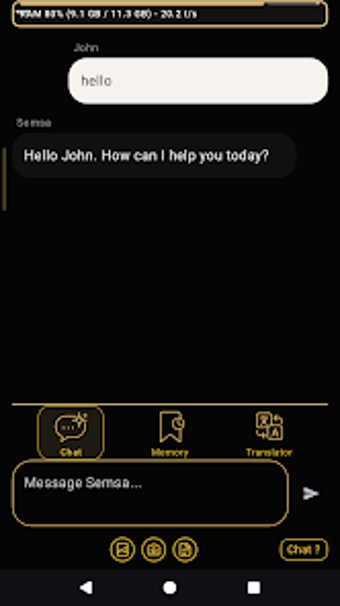
A clean chat layout reduces navigation and keeps interactions prompt-driven. The interface is optimized for Android, so questions and responses appear as conversational turns rather than deep menu workflows. The app is reported to deliver rapid response times, but it requires an active internet connection to reach the underlying language models. A privacy policy is available inside the app for teams handling sensitive material to inspect.
How it performs for business reliability and cross-device workflows
Designed for Android phones, the tool emphasizes short, text-focused tasks rather than full desktop document editing. That focus makes it suitable for translations, summaries, and quick revisions on the move, while more complex file preparation remains a desktop concern. The developer notes potential future expansions beyond text-only interactions. Dependence on connectivity and the mobile environment shapes where the app fits in a larger productivity stack.
Practical mobile companion for quick, text-first tasks with a connectivity trade-off
The app is a practical option for mobile professionals who need rapid, on-device assistance for drafting and quick technical references. Its reliance on an active internet connection constrains offline availability. For solo contributors and small teams prioritizing fast phone-based responses over heavyweight desktop document control, the app delivers a focused, phone-centered experience suited to fieldwork and short-form research.
Pros
Draft generation for emails, essays, and reports speeds text creation
Code snippet and debugging assistance provides quick technical references
Real-time translation and summarization condense long texts into bullets
Clean chat layout optimized for Android mobile interactions
Cons
Requires active internet connection to process queries
Focus on short, text-based tasks rather than desktop document workflows
Privacy policy should be reviewed before using with sensitive data
Laws concerning the use of this software vary from country to country. We do not encourage or condone the use of this program if it is in violation of these laws. Softonic may receive a referral fee if you click or buy any of the products featured here.